One-Click Borrowing Feature Launch: Building Professional-Level Leverage Trading
To address user concerns about the abstract and difficult-to-understand concept of margin in leverage trading, and to make leverage trading simpler and more direct, OKX has specially launched the one-click borrowing feature, completely upgrading and optimizing leverage trading to provide users with the smoothest leverage trading experience in the industry.
I. Introduction to Leverage Trading
In traditional finance, margin refers to funds used as collateral to obtain loans for increasing holdings of certain assets. The difference between the total investment and the borrowed amount is called leverage. In the field of digital assets trading, leverage trading refers to traders borrowing cryptocurrency from exchanges like OKX and using the multiplier of their margin to amplify potential returns or losses from trading.
Other Common Terms:
- Collateral: Funds you pay yourself for the trading amount.
- Leverage multiplier: If your own funds account for 50% of the trading amount, the leverage multiplier is 2x.
- Transferred assets: Assets transferred from the funding account to the one-click borrowing account.
- Borrowed assets: Assets borrowed from OKX in the one-click borrowing account.
II. Introduction to One-Click Borrowing Feature
The one-click borrowing feature provides users with a simple and direct leverage trading tool.
In "Manual Mode," users can control the borrowing amount for each order independently, but need to perform borrowing operations separately before placing an order.
In "Auto Mode," users can be assisted in obtaining the required borrowing amount for each order. In this mode, borrowing and repayment only occur after the order is filled.
Here's an example using the quick margin feature. Suppose Bitcoin's current spot price is 20,000 USDT. You have two choices:
- Go long BTC - buy low, sell high
- Go short BTC - sell high, buy low
Suppose you believe Bitcoin prices will rise within a certain period and want to multiply potential profits. You can use the one-click borrowing feature to establish a long position in Bitcoin.
If you use 10,000 USDT as collateral and borrow 10,000 USDT to go long on Bitcoin, the trading leverage is 2x. This means that if Bitcoin rises by 10%, your position will generate a 20% (2x) profit. Conversely, if Bitcoin prices fall by 10%, losses will also double to 20%.
Conversely, when you believe Bitcoin prices will fall, you can also use this feature to establish a short position in Bitcoin.
In summary, with the one-click borrowing feature, you can use borrowed funds to trade with any strategy, maximizing the empowerment of crypto-to-crypto trading.
Click to experience leverage trading
III. How to Use One-Click Borrowing Feature - Web
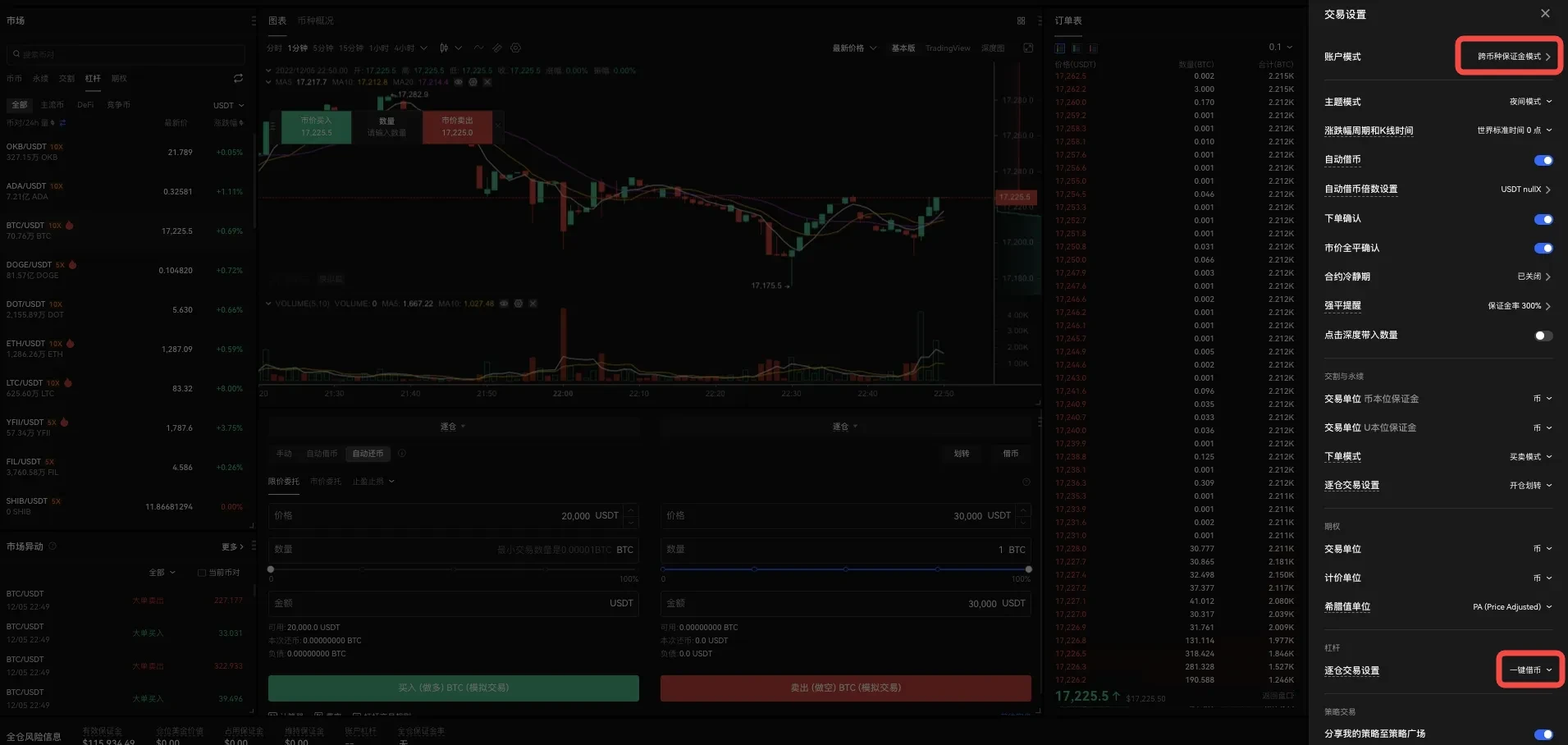
Manual Mode:
1. On the OKX official website homepage, select "Trade" and navigate to "Margin."
2. In the trading interface, click the gear icon in the upper right corner of the page to see your settings. Then click the "Isolated Mode Trading Settings" dropdown menu and select "One-Click Borrowing Mode." Select the trading pair you want to trade using one-click borrowing.
3. Below the trading window, you will see Manual Mode as the default option, with buy or sell options. Before proceeding, select "Transfer."
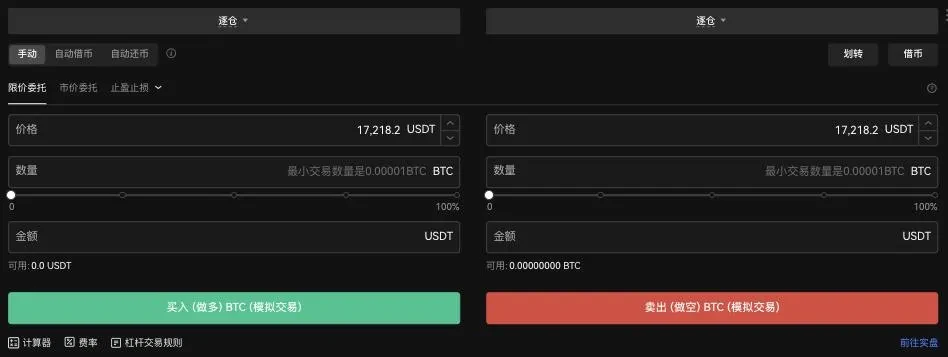
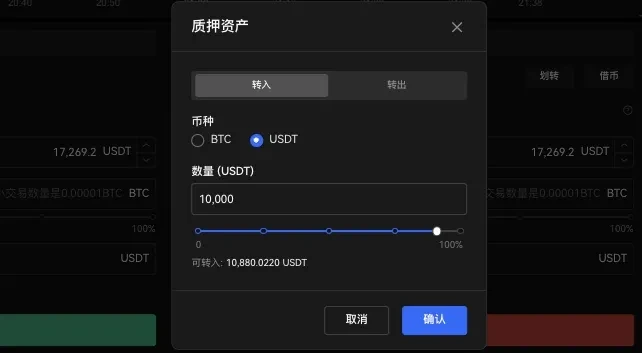
4. In "Transfer," you can enter the amount to transfer from your funding account to the one-click borrowing account. This is the collateral you're providing for this trade. In this example, transfer 10,000 USDT and select "Confirm."
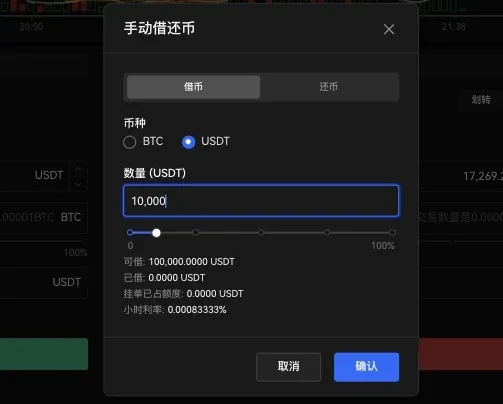
5. In Manual Mode, you next need to determine the borrowing amount. Suppose you need 20,000 USDT to complete the trade and have transferred 10,000 USDT from your funding account. In this case, you will borrow 10,000 USDT and select "Confirm."
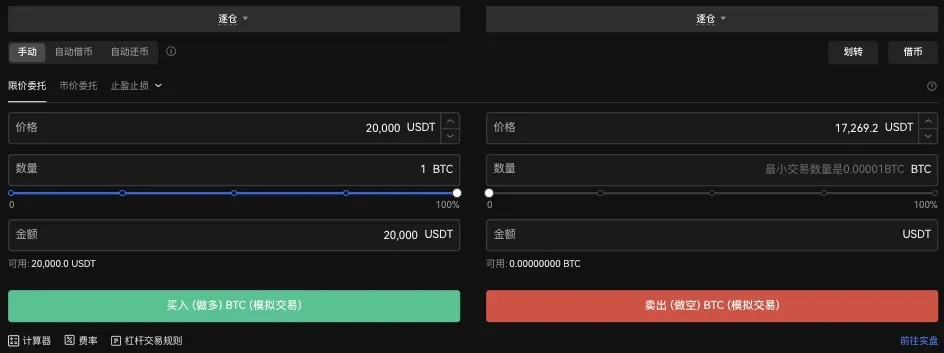
6. Now you have 20,000 USDT available for trading. Suppose BTC price is 20,000 USDT. Enter the USDT price and the quantity you want to buy, then select "Buy (Long) BTC."
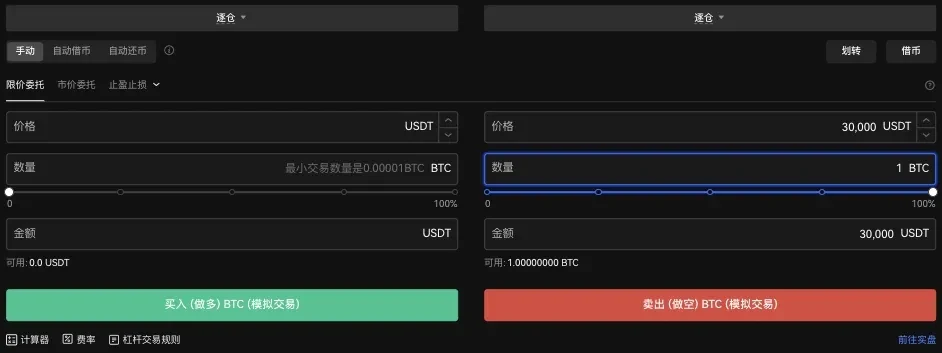
7. Suppose BTC price has risen to 30,000 USDT. To close the long position, you can enter the price (USDT) and quantity (BTC), then select "Sell (Short) BTC" to sell BTC.
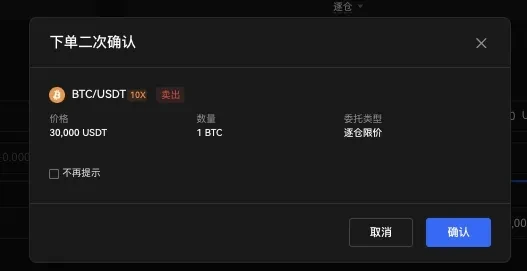
8. Select "Confirm" to confirm this order.
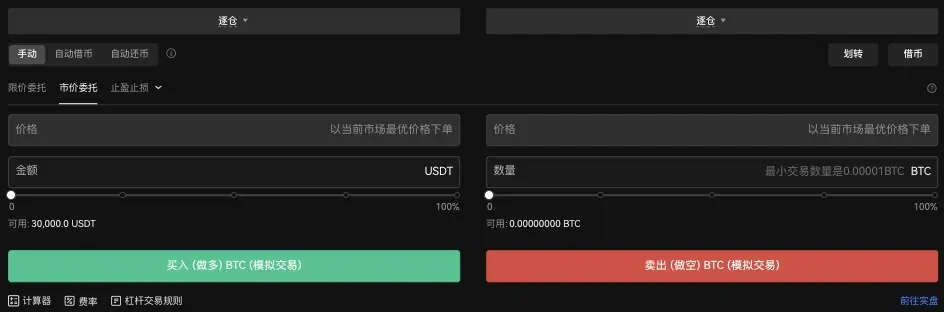
9. Your one-click borrowing account balance will show 30,000 USDT.
10. To completely close your position, you must repay the borrowed amount. Select "Borrow" and switch to "Repay." You can see the borrowed amount at the bottom of the page. Enter the amount to repay and select "Confirm."
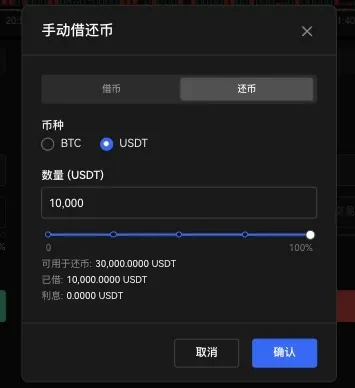
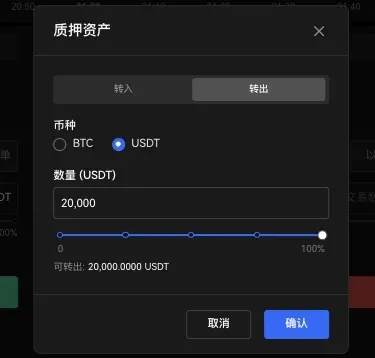
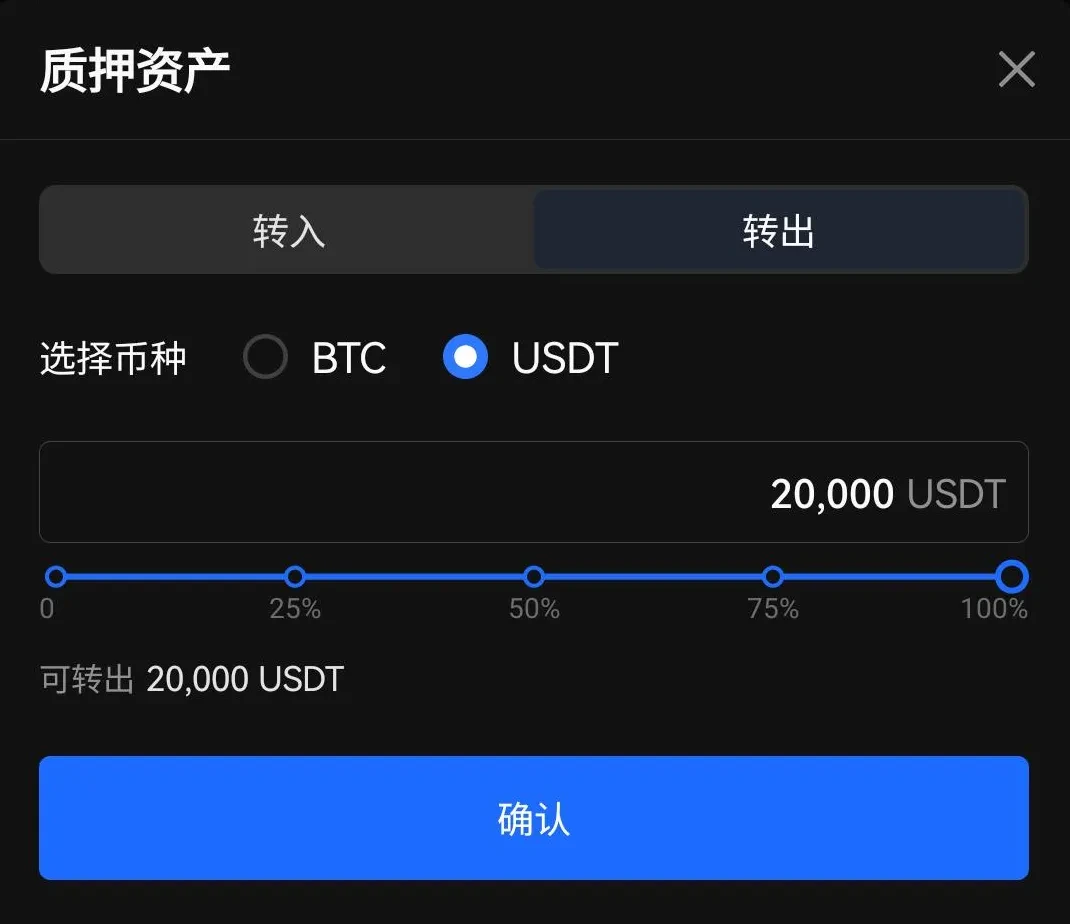
11. Before completing the transfer, funds will remain in the one-click borrowing account. To transfer funds, select "Transfer," then select "Transfer Out." Available funds will be displayed at the bottom of the page. Enter the amount to transfer, then select "Confirm."
Auto Mode:
1. On the OKX official website homepage, select "Trade" and navigate to "Margin."
2. In the trading interface, click the gear icon in the upper right corner of the page to see your settings. Then click the "Isolated Mode Trading Settings" dropdown menu and select "One-Click Borrowing Mode."
3. Tap the trading pair listed at the top of the page and select the pair you want to trade using one-click borrowing.
4. Below the trading window, you will see Manual Mode as the default option. Switch to "Auto Borrow." Before proceeding, select "Transfer."

5. In "Transfer," you can enter the amount to transfer from your funding account to the one-click borrowing account. This is the collateral you're providing for this trade. In this example, transfer 10,000 USDT and select "Confirm."
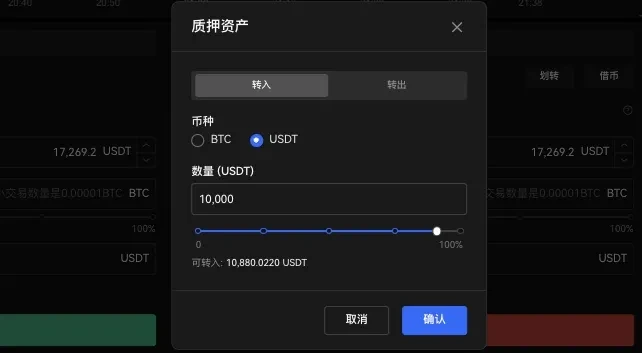
6. Suppose Bitcoin price is 20,000 USDT. Enter the USDT price and the BTC quantity you want to purchase. Select "Buy (Long) BTC," and the one-click borrowing feature will automatically calculate the borrowing amount and execute the order.
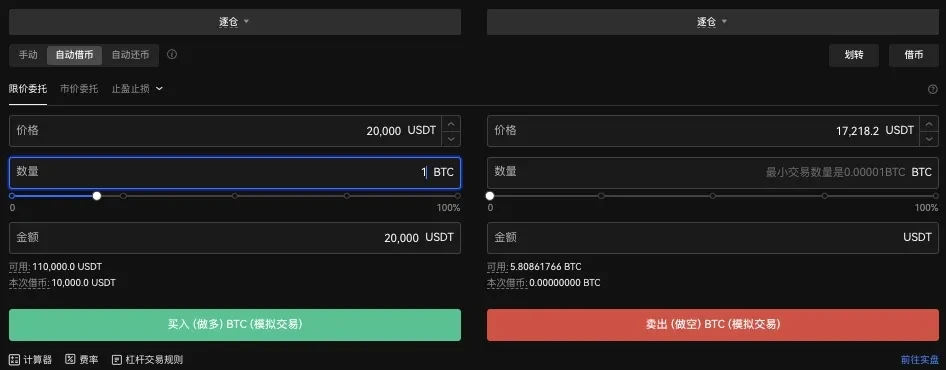
7. Select "Confirm" to confirm the order.
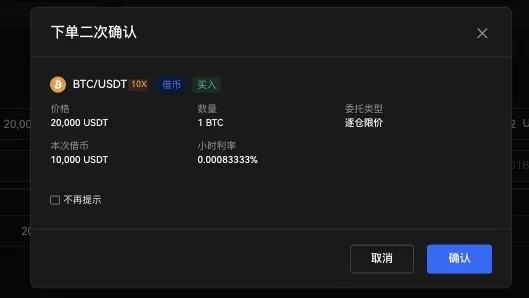
8. Suppose BTC price has risen to 30,000 USDT. To close the long position, simply enter the price (USDT) and quantity (BTC), then select "Sell (Short) BTC" to sell BTC.
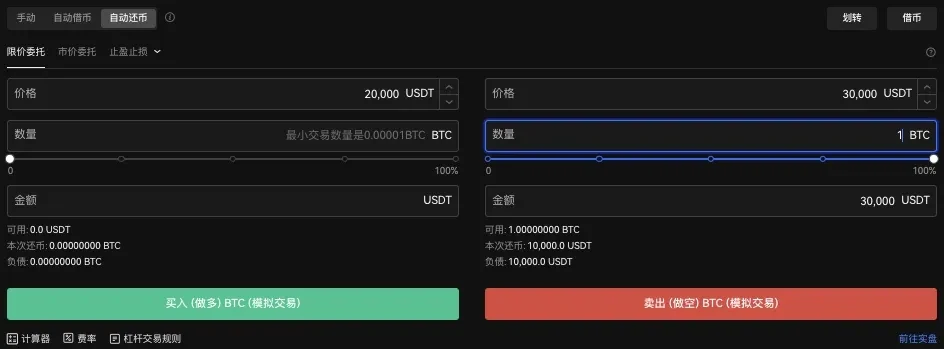
9. In Auto Mode, borrowed amounts are automatically repaid. Select "Confirm" to confirm this order.
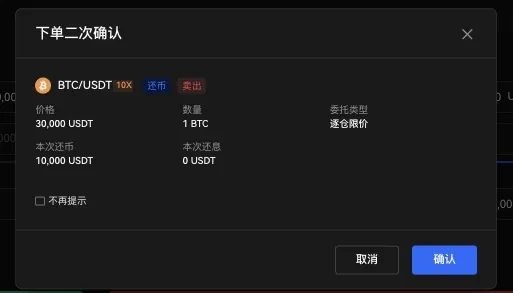
10. Your one-click borrowing account will show your profit balance as 20,000 USDT.
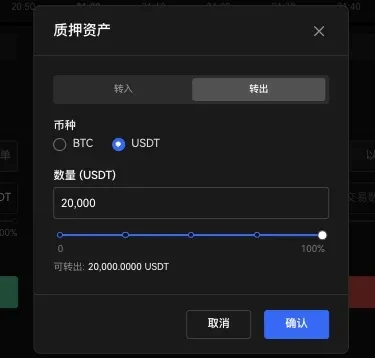
11. Before completing the transfer, funds will remain in the one-click borrowing account. To transfer funds, select "Transfer," then select "Transfer Out." Available funds will be displayed at the bottom of the page. Enter the amount to transfer, then select "Confirm."
IV. How to Use One-Click Borrowing Feature - App
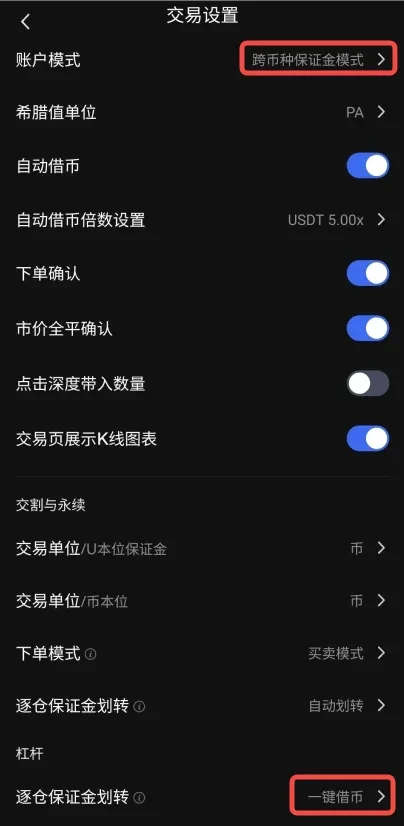
1. On the OKX homepage, select "Trade," click the three dots in the upper right corner, and the "Features" tab will pop up.
2. Then click "Settings," change the isolated mode trading settings to "One-Click Borrowing Mode," and select the trading pair you want to trade using one-click borrowing.
3. Below the trading window, you will see Manual Mode as the default option, with buy or sell options. Before proceeding, select "Transfer."
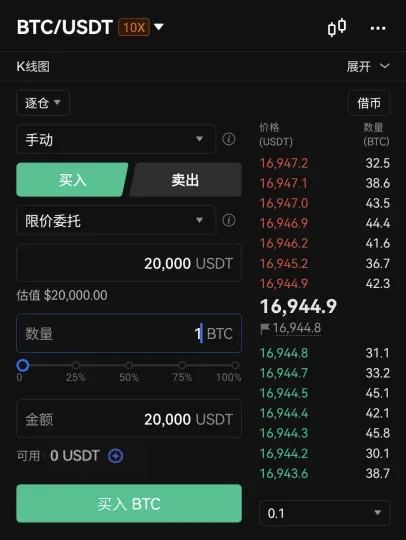
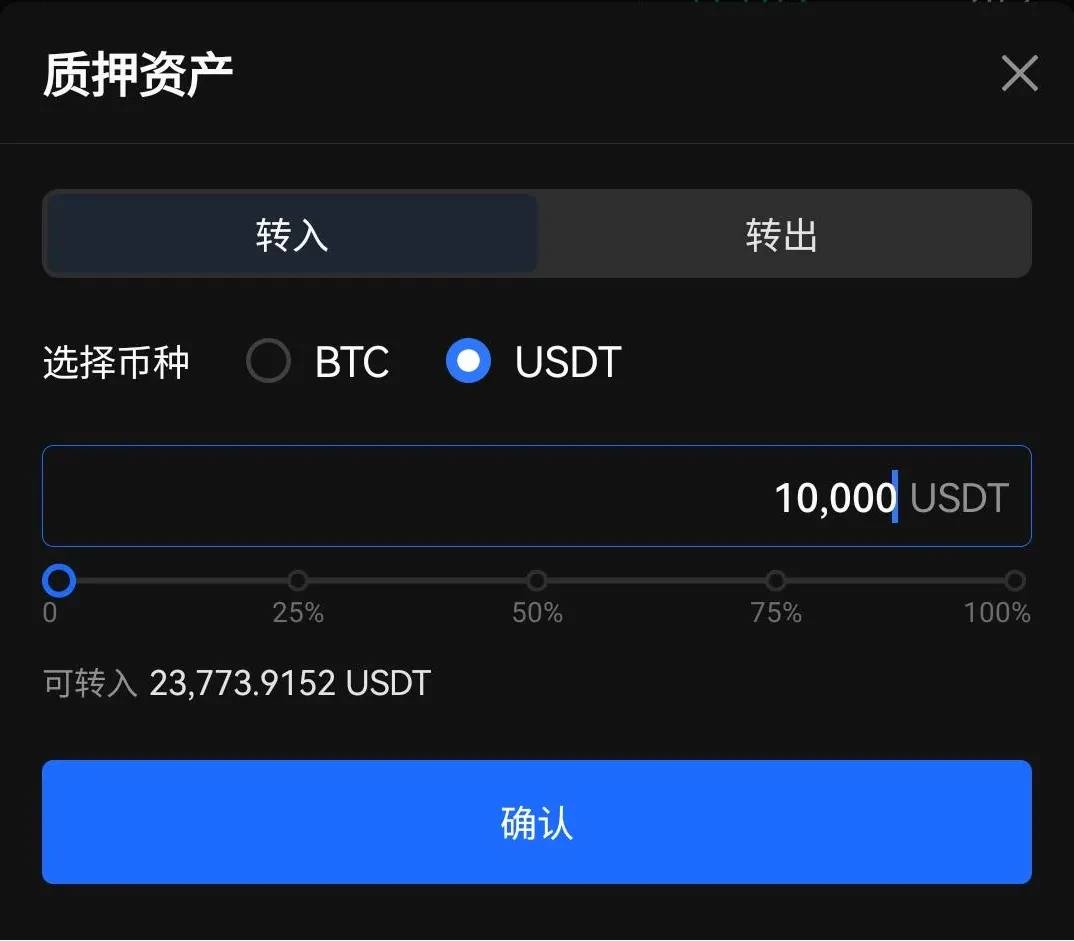
4. In "Transfer," you can enter the amount to transfer from your funding account to the one-click borrowing account. This is the collateral you're providing for this trade. In this example, transfer 10,000 USDT and select "Confirm."
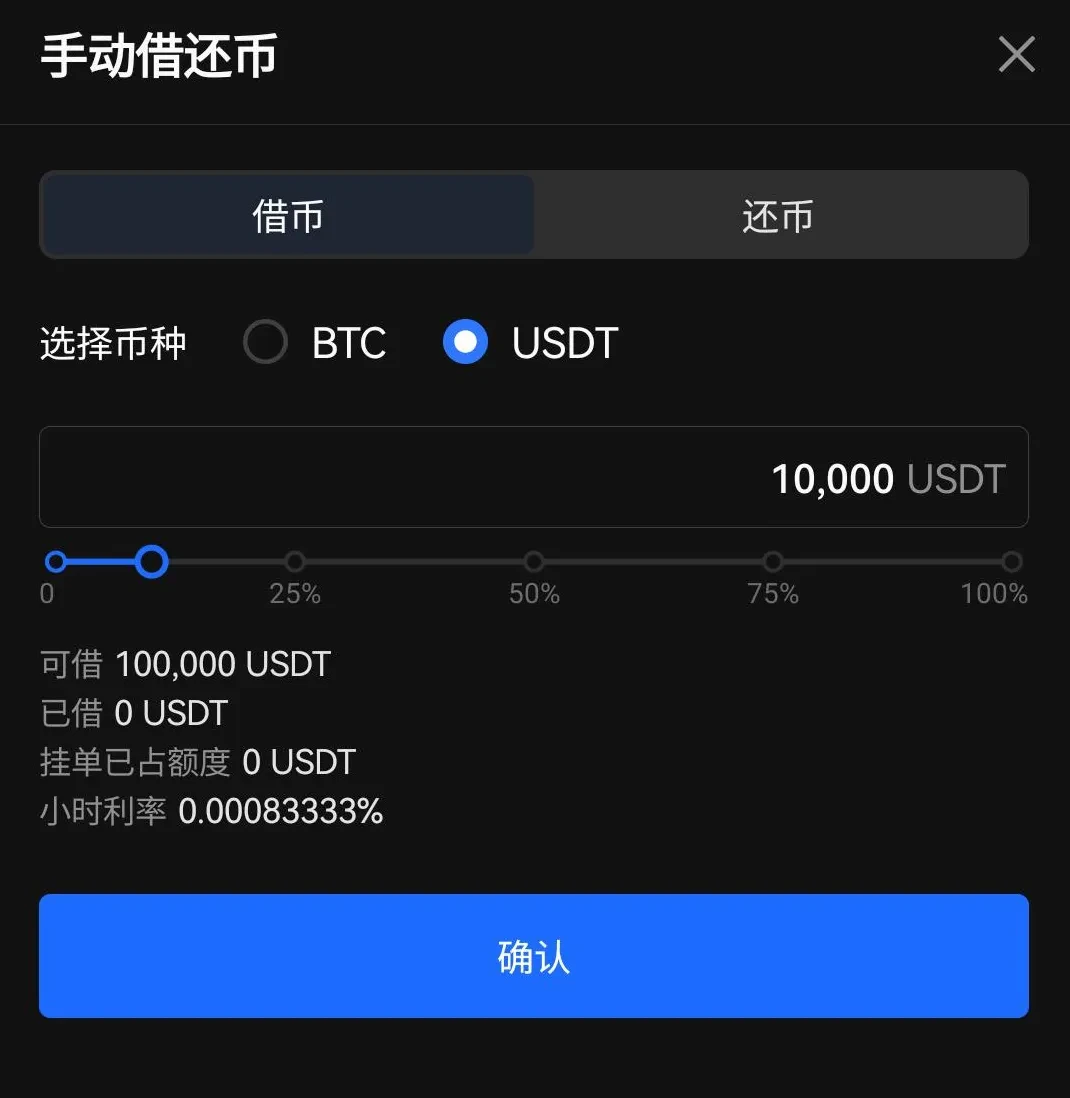
5. In Manual Mode, you next need to determine the borrowing amount. Suppose you need 20,000 USDT to complete the trade and have transferred 10,000 USDT from your funding account. In this case, you will borrow 10,000 USDT and select "Confirm."
6. Now you have 20,000 USDT available for trading. Suppose BTC price is 20,000 USDT. Enter the USDT price and the amount you want to buy, then select "Buy (Long) BTC."
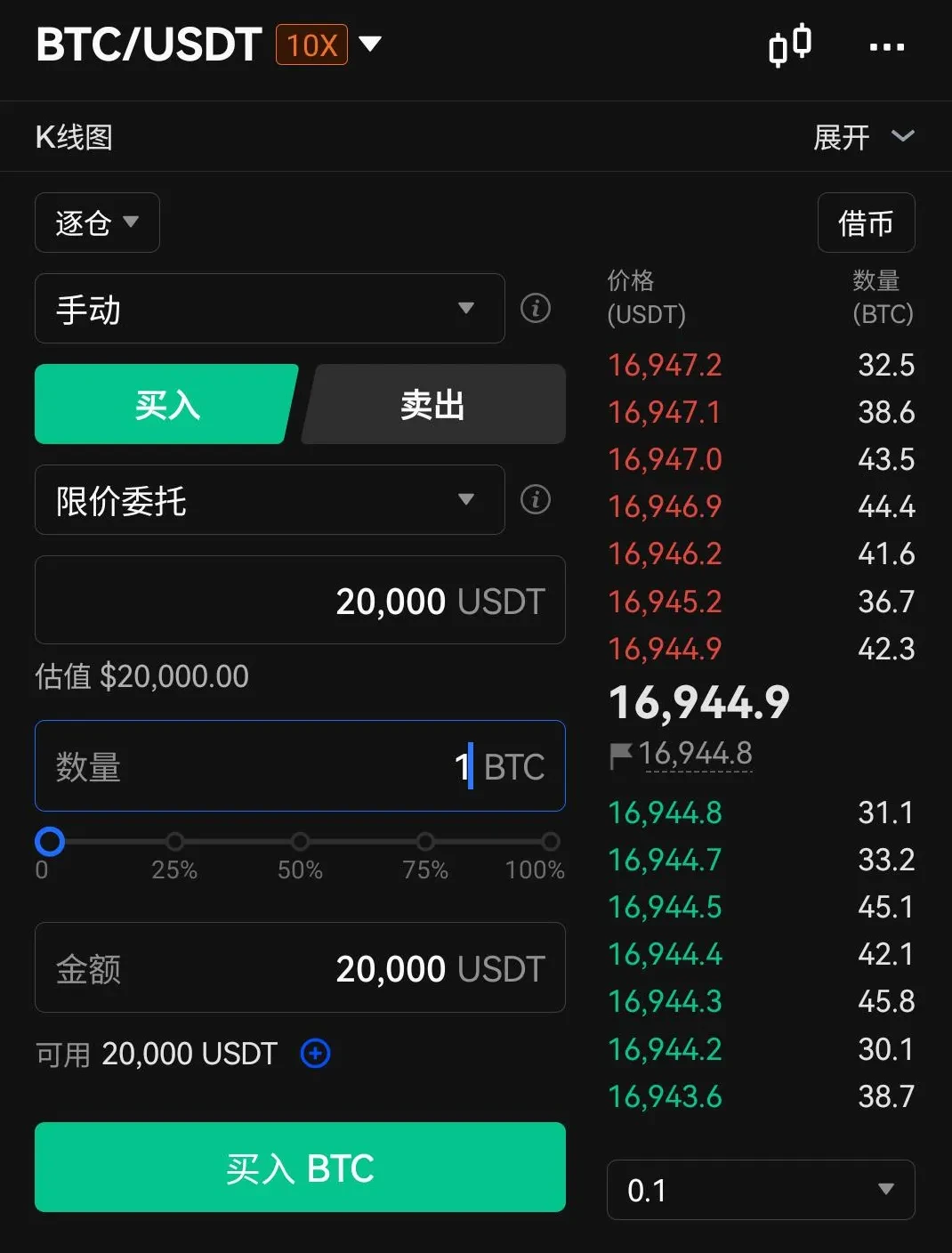
7. Suppose BTC price has risen to 30,000 USDT. To close the long position, you can enter the price (USDT) and quantity (BTC), then select "Sell (Short) BTC" to sell BTC.
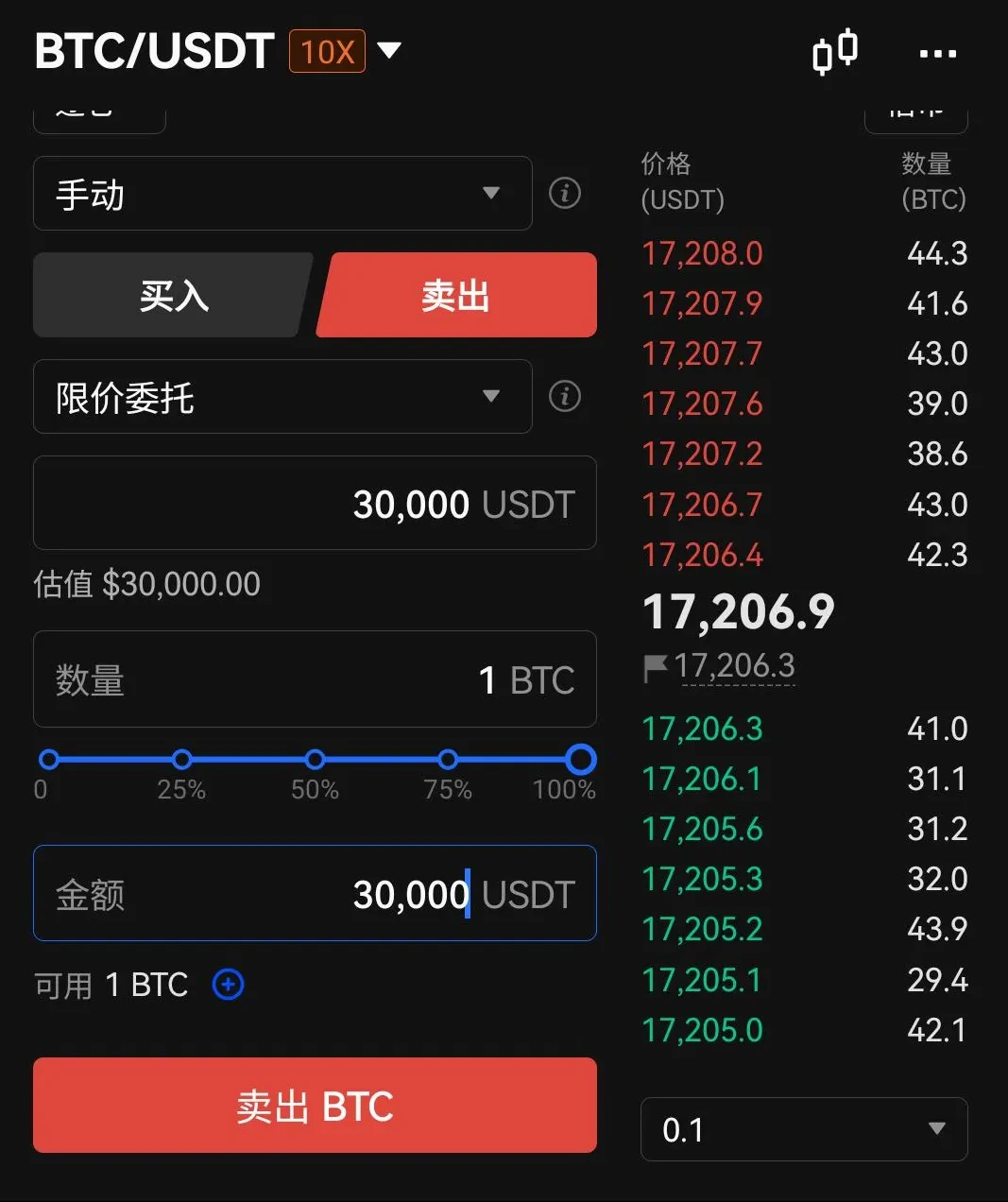
8. Select "Confirm" to confirm this order.
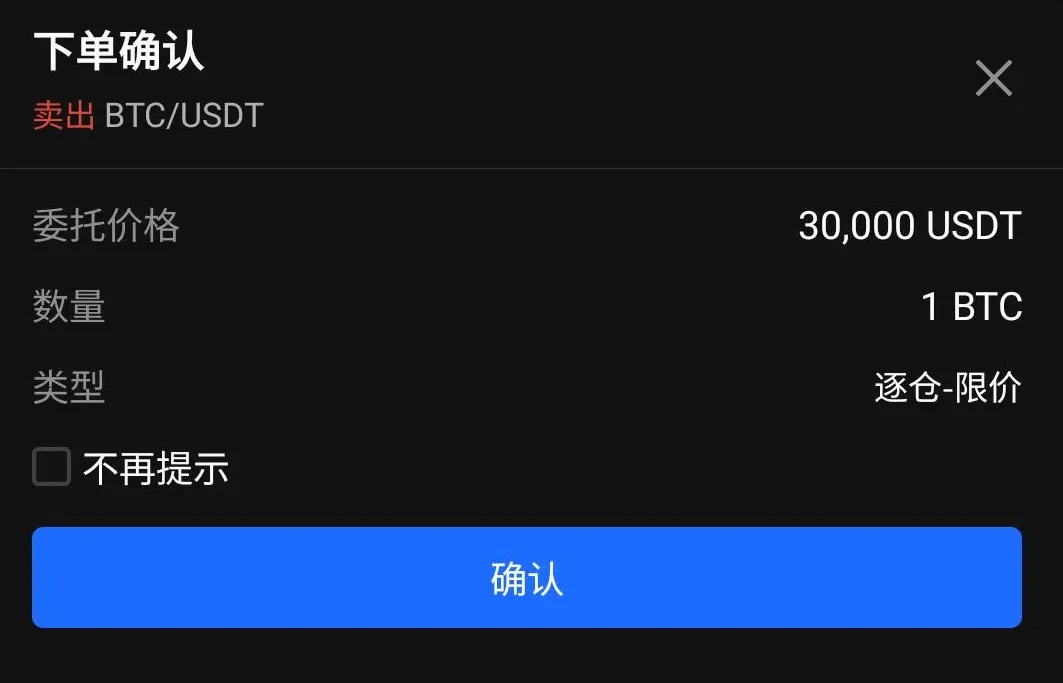
9. Your one-click borrowing account balance will show 30,000 USDT.
10. To completely close your position, you must repay the borrowed amount. Select "Borrow" and switch to "Repay." You can see the borrowed amount at the bottom of the page. Enter the amount to repay and select "Confirm."
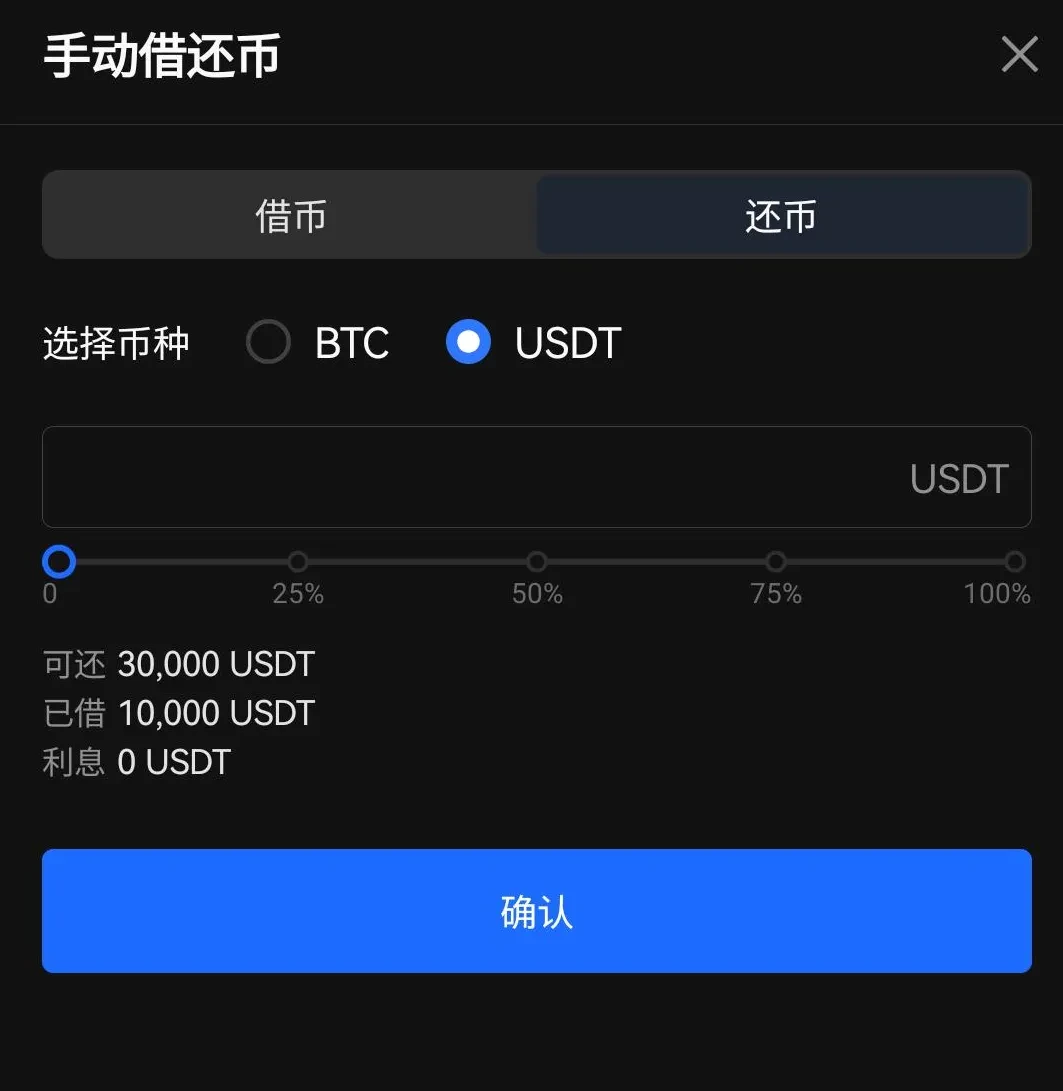
11. Before completing the transfer, funds will remain in the margin account. To transfer funds, select "Transfer," then select "Transfer Out." Available funds will be displayed at the bottom of the page. Enter the amount to transfer, then select "Confirm."
Click to experience leverage trading
Disclaimer
This article may contain product-related content that is not applicable to your region. This article is intended to provide general information only and does not assume responsibility for any factual errors or omissions herein. This article represents only the author's personal views and does not represent the views of OKX. This article is not intended to provide any of the following advice, including but not limited to: (i) investment advice or investment recommendations; (ii) offers or solicitations to buy, sell, or hold digital assets; or (iii) financial, accounting, legal, or tax advice. Holding digital assets (including stablecoins) involves high risk, may fluctuate significantly, and may even become worthless. You should carefully consider whether trading or holding digital assets is suitable for you based on your financial situation. For questions about your specific situation, please consult your legal/tax/investment professional. The information appearing in this article (including market data and statistics, if any) is for general reference only. Although we have taken all reasonable precautions in preparing these data and charts, we assume no responsibility for any factual errors or omissions expressed herein. © 2025 OKX. This article may be reproduced or distributed in full, or excerpts of 100 words or less from this article may be used, provided that such use is non-commercial. Any reproduction or distribution of the entire article must also prominently state: "Copyright © 2025 OKX, used with permission." Permitted excerpts must cite the article name and include attribution, such as "Article Name, [Author Name (if applicable)], © 2025 OKX." Portions of this content may be generated or assisted by artificial intelligence (AI) tools. Derivative works or other uses of this article are not permitted.
Show More
Recommended Reading
Profit Even When Bitcoin Falls? How to Conduct Contract Trading
With the continuous expansion of the cryptocurrency market represented by Bitcoin, various forms of derivative trading have gradually emerged beyond spot trading as a tool to hedge risk, among which contract trading has received the most attention. What is contract trading? Contracts are the most common trading contract form in the cryptocurrency derivatives market. Digital assets contract trading refers to buyers and sellers agreeing to trade certain assets at a specified price at a future time.
January 16, 2026
Simpler Than Copying Strategies? One-Click Copy Top Strategy Traders on OKX, Let Traders Earn Money for You
Whether in traditional finance or the cryptocurrency market, strategy trading is a very important and crucial method in the trading system. When facing complex trading environments and extreme market conditions, even with solid theoretical technical knowledge and rich trading experience, it's easy to miss trading opportunities or make wrong judgments and operations due to emotional influence. Strategy trading is precisely an effective tool that can solve these problems. Now that you have trading tools, how to make
November 21, 2025
V. Strategy Trading Series Course - Savings
Preface: We often have this conjecture: there are many digital assets with significant increases in bull markets. If we can continuously capture coins with large increases, for example, catching a doubled digital asset every month, your assets will become 2 to the power of 12, i.e., 4096 times, after one year, which is very amazing. Of course, this is also almost impossible to achieve, because we can hardly continuously catch coins with large increases. This is also a problem many users encounter: in bull markets, although
November 3, 2025
Which Countries/Regions Do Not Support Registration to Use OKX
OKX currently does not provide services to customers in the following regions: certain US territories, such as New York, Texas, Puerto Rico, American Samoa, Guam, Commonwealth of the Northern Mariana Islands, US Virgin Islands (St. Croix, St. John, and St. Thomas), Cuba, Iran, North Korea, Crimea, Malaysia, Syria, Bangladesh, and Bolivia. For details, please refer to the OKX Terms of Service.
April 25, 2024
Quickly Understand OKX Common Products and Features
OKX (www. okx. com) is one of the world's famous digital assets service platforms, mainly providing global users with Bitcoin, Ethereum and other digital assets crypto-to-crypto and derivatives trading services, while also exploring the world of DeFi, dApps, NFTs, and GameFi together with users. On OKX, you can enjoy smooth trading experiences such as crypto-to-crypto and contracts, keep up with token information in hot areas/concepts for the first time, and also
April 25, 2024
Zero-Based Learning of Candlestick Charts | 5 Importance of Candlestick Pattern Applications
Rises and falls have trends; read the language of prices. Buying and selling have signals; say goodbye to feeling-based trading. I. Bullish Candlestick Combinations at Key Positions In the first two sections of this chapter, we explained the applications of bullish and bearish candlestick combinations, but these combinations are not effective when appearing at any position. In this section, we will explain the importance of where combinations appear. In which positions can bullish combinations better play their role? The first situation: in a clear upward trend, the nearby previous
April 25, 2024